> ## Documentation Index
> Fetch the complete documentation index at: https://help.privy.com/llms.txt
> Use this file to discover all available pages before exploring further.
# Personalize Your Emails and Texts
> Send more personal, tailored content that connects with your audience on an individual level.
Personalization allows you to connect with your audience on an individual level, which can make all the difference when someone is quickly deciding between dismissing or engaging with your content. Adding personalization to subject lines, body content, and even call-to-actions can make a huge difference in connecting with your subscribers.
## How does personalization work?
Information collected about an individual is stored in fields on their contact profile (e.g., First Name). This information then becomes available for exhibition in your emails via **Merge Tags**. When viewed by a contact in an email, these tags automatically reference and show the information associated with the recipients' contact profile.
## Personalizing Emails
### Supported Merge Tags
| Merge Tag | Information Shown |
| --------------------------------- | -------------------------------------------------------------------------------------------------------------------------------------------------------------------------------- |
| `{{ contact.email }}` | The contact's email address. |
| `{{ contact.first_name }}` | The contact's first name. |
| `{{ contact.last_name }}` | The contact's last name. |
| `{{ contact.name }}` | The contact's full name. |
| `{{coupon_code}}` | The coupon code associated with the contact or attached to your email. |
| `{{ contact.custom_fields.* }}` | The value stored in a custom field used to collect contact information. For example, `{{ contact.custom_fields.favorite_color }}` would show the contact's Favorite Color value. |
| `{{ business.name }}` | The name of your business. |
| `{{ business.url }}` | The website for your business. You can manage your business's URL in your **Business Settings**. |
| `{{ business.unsubscribe_link }}` | A unique link that unsubscribes your contact from all future emails. |
### Using Merge Tags
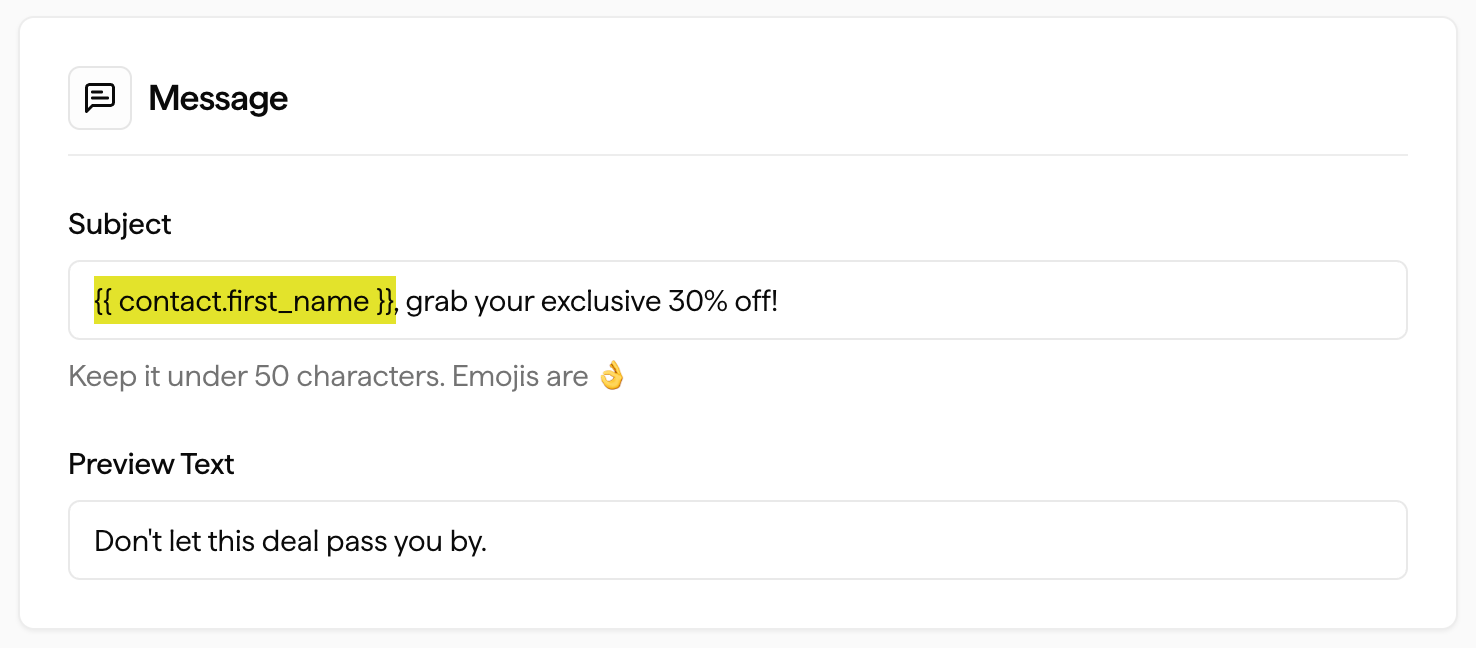
**How to personalize your Subject Lines:**
A merge tag must be manually typed into a Subject Line. The easiest way to accomplish this is by copying one of the merge tags from this page and then pasting them into your subject line, as shown below.
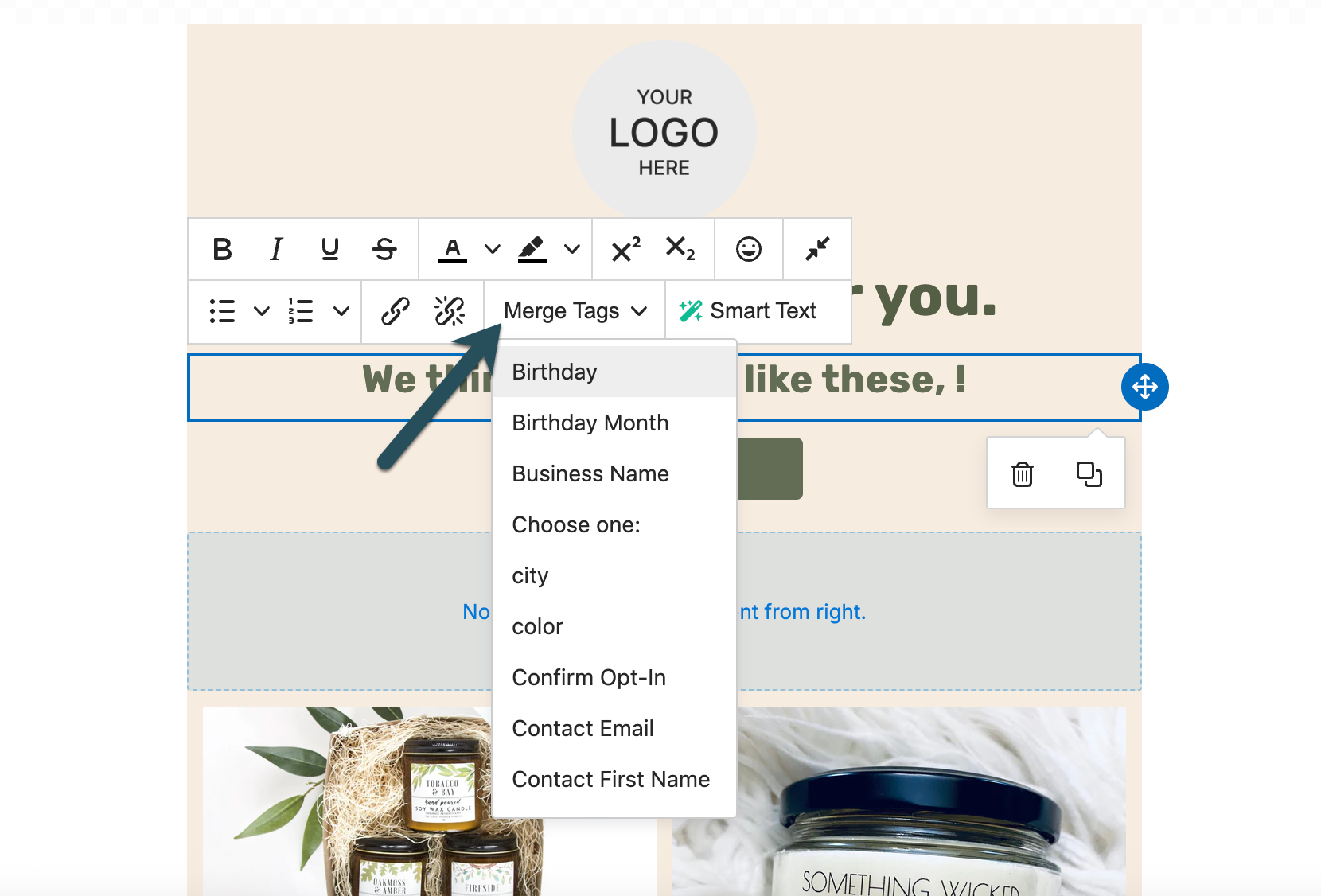
 **How to personalize your body content:**
To insert a merge tag into the body content of an email, click into a **Text Box**, select the **Merge Tags** dropdown menu from the editing toolbar, and select the desired field.
**How to personalize your body content:**
To insert a merge tag into the body content of an email, click into a **Text Box**, select the **Merge Tags** dropdown menu from the editing toolbar, and select the desired field.
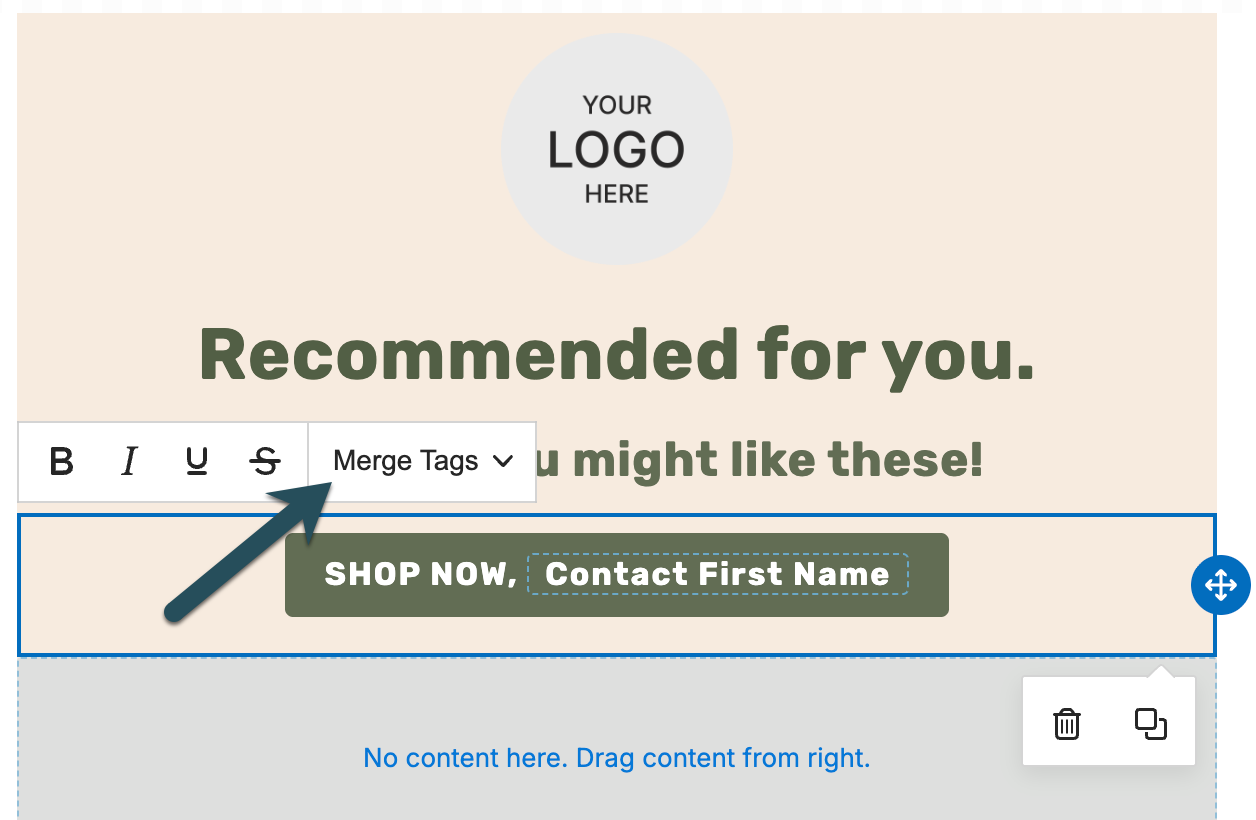
 **How to personalize a Call-To-Action:**
A merge tag must be manually typed into a button. The easiest way to accomplish this is by copying one of the merge tags from this page and then pasting them into your subject line, as shown below.
**How to personalize a Call-To-Action:**
A merge tag must be manually typed into a button. The easiest way to accomplish this is by copying one of the merge tags from this page and then pasting them into your subject line, as shown below.
 ### Default or Fallback Values
For any merge tag, you can add a default value to provide a placeholder if there is no information available to pull in from the recipient's contact profile. If a default value isn't provided and there's no value on the contact profile, a blank space will appear instead. To include a default, manually type your merge tag into your content and use this format:
`{{ contact.first_name|default:'there' }}`
| Example Merge Tag | Example Output |
| ----------------------------------------------- | ----------------------------- |
| `Hi {{ contact.first_name\|default:'there' }},` | "Hi John," **OR** "Hi there," |
## Product Merge Tags in Flows
When building Flow emails and SMS messages, you can personalize content with product-specific merge tags. These tags pull in product details relevant to the Flow's trigger.
### Back in Stock
| Merge Tag | Information Shown |
| ----------------------------------- | --------------------------- |
| `{{ product_back_in_stock.title }}` | The product's name. |
| `{{ product_back_in_stock.price }}` | The product's price. |
| `{{ product_back_in_stock.url }}` | A link to the product page. |
### Browse Abandonment
| Merge Tag | Information Shown |
| ------------------------------------------------ | ------------------------------------------ |
| `{{ product_recently_viewed.title }}` | The product's name. |
| `{{ product_recently_viewed.price }}` | The product's price. |
| `{{ product_recently_viewed.compare_at_price }}` | The product's compare-at (original) price. |
| `{{ product_recently_viewed.url }}` | A link to the product page. |
Product merge tags are available in Flow emails and SMS — they are not yet available in one-time campaigns. To insert them, use the **Merge Tags** dropdown in the email editor or the **Personalization** menu in the SMS editor.
### Special Occasion
For **Special Occasion** and other **date-triggered** Flows, occasion data is available under the Liquid key **`date`**, using the **date field** you chose on the Flow trigger (for example Birthday or Wedding Anniversary) and the contact’s value for that field.
| Merge Tag | Information Shown |
| -------------------------- | -------------------------------------------------------------------------------- |
| `{{ date.month }}` | Full month name (e.g. January). |
| `{{ date.day }}` | Day of the month. |
| `{{ date.year }}` | Year. |
| `{{ date.age }}` | Age in years (birthday-style, from the occasion date). |
| `{{ date.property_name }}` | Label of the date property (for example the field name shown in your dashboard). |
There is **no** single merge tag for one fully formatted date—combine `month`, `day`, and `year` in your copy if you need a full date line.
**Flow email editor:** Depending on template and editor version, the **Merge Tags** menu may not list every Flow-only tag in a submenu. You can still paste or type Liquid from this page into subject lines, text blocks, and buttons.
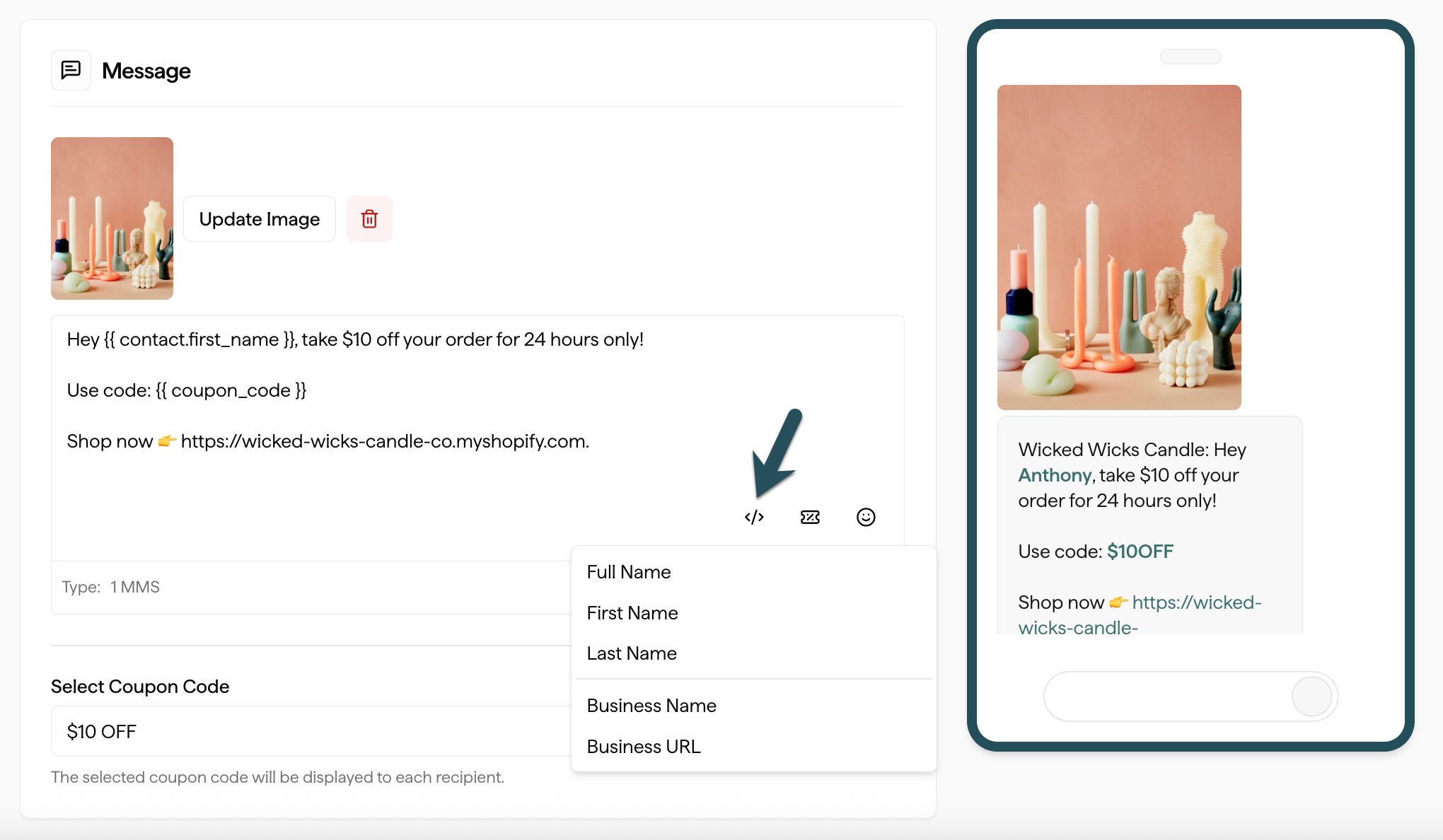
## Personalizing SMS
To add a personalization tag to a text message, click on the **Personalization** dropdown menu and select which tag you want to insert into your content:
### Default or Fallback Values
For any merge tag, you can add a default value to provide a placeholder if there is no information available to pull in from the recipient's contact profile. If a default value isn't provided and there's no value on the contact profile, a blank space will appear instead. To include a default, manually type your merge tag into your content and use this format:
`{{ contact.first_name|default:'there' }}`
| Example Merge Tag | Example Output |
| ----------------------------------------------- | ----------------------------- |
| `Hi {{ contact.first_name\|default:'there' }},` | "Hi John," **OR** "Hi there," |
## Product Merge Tags in Flows
When building Flow emails and SMS messages, you can personalize content with product-specific merge tags. These tags pull in product details relevant to the Flow's trigger.
### Back in Stock
| Merge Tag | Information Shown |
| ----------------------------------- | --------------------------- |
| `{{ product_back_in_stock.title }}` | The product's name. |
| `{{ product_back_in_stock.price }}` | The product's price. |
| `{{ product_back_in_stock.url }}` | A link to the product page. |
### Browse Abandonment
| Merge Tag | Information Shown |
| ------------------------------------------------ | ------------------------------------------ |
| `{{ product_recently_viewed.title }}` | The product's name. |
| `{{ product_recently_viewed.price }}` | The product's price. |
| `{{ product_recently_viewed.compare_at_price }}` | The product's compare-at (original) price. |
| `{{ product_recently_viewed.url }}` | A link to the product page. |
Product merge tags are available in Flow emails and SMS — they are not yet available in one-time campaigns. To insert them, use the **Merge Tags** dropdown in the email editor or the **Personalization** menu in the SMS editor.
### Special Occasion
For **Special Occasion** and other **date-triggered** Flows, occasion data is available under the Liquid key **`date`**, using the **date field** you chose on the Flow trigger (for example Birthday or Wedding Anniversary) and the contact’s value for that field.
| Merge Tag | Information Shown |
| -------------------------- | -------------------------------------------------------------------------------- |
| `{{ date.month }}` | Full month name (e.g. January). |
| `{{ date.day }}` | Day of the month. |
| `{{ date.year }}` | Year. |
| `{{ date.age }}` | Age in years (birthday-style, from the occasion date). |
| `{{ date.property_name }}` | Label of the date property (for example the field name shown in your dashboard). |
There is **no** single merge tag for one fully formatted date—combine `month`, `day`, and `year` in your copy if you need a full date line.
**Flow email editor:** Depending on template and editor version, the **Merge Tags** menu may not list every Flow-only tag in a submenu. You can still paste or type Liquid from this page into subject lines, text blocks, and buttons.
## Personalizing SMS
To add a personalization tag to a text message, click on the **Personalization** dropdown menu and select which tag you want to insert into your content:
 ## FAQs
**What happens if there is no value associated with the personalization merge tag you chose?**
If a contact is missing the value that you chose for your personalization tag, a blank space will appear instead.
For example, if you write `Hi {{ contact.first_name }}` in your Subject Line and the email is sent to a contact without a first name, the Subject Line will read `Hi `.
## FAQs
**What happens if there is no value associated with the personalization merge tag you chose?**
If a contact is missing the value that you chose for your personalization tag, a blank space will appear instead.
For example, if you write `Hi {{ contact.first_name }}` in your Subject Line and the email is sent to a contact without a first name, the Subject Line will read `Hi `.