> ## Documentation Index
> Fetch the complete documentation index at: https://help.privy.com/llms.txt
> Use this file to discover all available pages before exploring further.
# Understanding Reachability
> Learn how your contacts' email permissions impact your ability to engage with them.
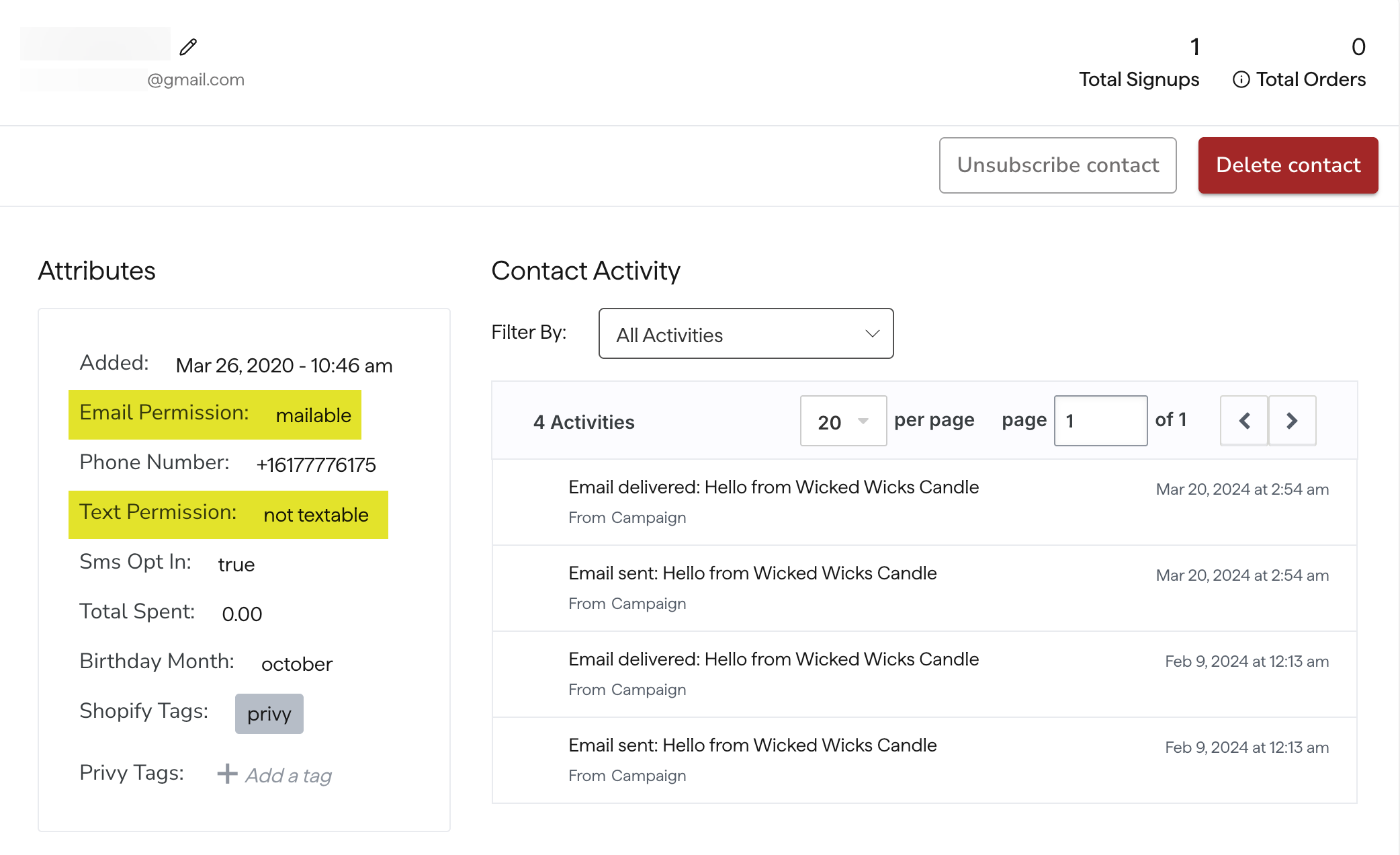
A contact's email and text permissions determine whether or not they are reachable. Each status is ultimately determined by the contact's previous interactions with your brand. A contact's current permissions are available for review in both your [Contacts](https://dashboard.privy.com/contacts) page, and the contact's individual profile.

 ## Email Permissions
There are currently 4 possible email permissions:
**The contact is eligible to receive emails.** A contact typically becomes mailable by submitting a form with the proper [consent](https://privy.helpscoutdocs.com/article/206-understand-marketing-consent) or by being included in an [import](https://privy.helpscoutdocs.com/article/50-create-and-manage-contacts) designated for subscribed contacts.
**The contact is not eligible to receive emails.** A contact becomes unsubscribed by opting out via the email preferences link in your emails or by being included in an [import](https://privy.helpscoutdocs.com/article/50-create-and-manage-contactshttps://help.privy.com/docs/learn/contact-management/unsubscribe-contacts#bulk-unsubscribe) designated for unsubscribed contacts.
**The contact is not eligible to receive emails** because their email address is invalid or Privy had trouble getting the server to accept the email (e.g., Hard Bounce).
**The contact is not eligible to receive emails yet** because the contact has neither opted in nor opted out of receiving emails. They will not be mailable until they have opted in. A contact typically becomes unset if they completed a purchase without also opting into marketing communications, or if they were included in an import that is pending review by Privy's compliance team. Any newly imported contacts will remain in an unset status until approved.
### Managing Email Permissions
**Resubscribing a Contact:** Unsubscribed contacts will be resubscribed when a signup event provides [consent](https://privy.helpscoutdocs.com/article/206-understand-marketing-consent). Suppressed contacts will not be resubscribed, as that is currently treated as a permanent state. If you believe a contact has been incorrectly marked as suppressed, please [contact the support team](mailto:support@privy.com).
**Unsubscribing a Contact:** Contacts can unsubscribe themselves by clicking the email preferences link at the bottom of any email received from Privy.
## Email Permissions
There are currently 4 possible email permissions:
**The contact is eligible to receive emails.** A contact typically becomes mailable by submitting a form with the proper [consent](https://privy.helpscoutdocs.com/article/206-understand-marketing-consent) or by being included in an [import](https://privy.helpscoutdocs.com/article/50-create-and-manage-contacts) designated for subscribed contacts.
**The contact is not eligible to receive emails.** A contact becomes unsubscribed by opting out via the email preferences link in your emails or by being included in an [import](https://privy.helpscoutdocs.com/article/50-create-and-manage-contactshttps://help.privy.com/docs/learn/contact-management/unsubscribe-contacts#bulk-unsubscribe) designated for unsubscribed contacts.
**The contact is not eligible to receive emails** because their email address is invalid or Privy had trouble getting the server to accept the email (e.g., Hard Bounce).
**The contact is not eligible to receive emails yet** because the contact has neither opted in nor opted out of receiving emails. They will not be mailable until they have opted in. A contact typically becomes unset if they completed a purchase without also opting into marketing communications, or if they were included in an import that is pending review by Privy's compliance team. Any newly imported contacts will remain in an unset status until approved.
### Managing Email Permissions
**Resubscribing a Contact:** Unsubscribed contacts will be resubscribed when a signup event provides [consent](https://privy.helpscoutdocs.com/article/206-understand-marketing-consent). Suppressed contacts will not be resubscribed, as that is currently treated as a permanent state. If you believe a contact has been incorrectly marked as suppressed, please [contact the support team](mailto:support@privy.com).
**Unsubscribing a Contact:** Contacts can unsubscribe themselves by clicking the email preferences link at the bottom of any email received from Privy.
 Additionally, if a contact requests that you unsubscribe their email address on their behalf, you can manually unsubscribe them by clicking the **Unsubscribe** button on their profile. [Learn more.](https://help.privy.com/docs/learn/contact-management/unsubscribe-contacts#individual-unsubscribe)
### Syncing Email Permissions
**Syncing Mailable and Unset Contacts:** When syncing a signup event to an external email service provider (ESP), Privy will send a marketing flag when possible. The provider can then use the information to update [consent](https://privy.helpscoutdocs.com/article/206-understand-marketing-consent) and reachability information on their end.
Additionally, if a contact requests that you unsubscribe their email address on their behalf, you can manually unsubscribe them by clicking the **Unsubscribe** button on their profile. [Learn more.](https://help.privy.com/docs/learn/contact-management/unsubscribe-contacts#individual-unsubscribe)
### Syncing Email Permissions
**Syncing Mailable and Unset Contacts:** When syncing a signup event to an external email service provider (ESP), Privy will send a marketing flag when possible. The provider can then use the information to update [consent](https://privy.helpscoutdocs.com/article/206-understand-marketing-consent) and reachability information on their end.
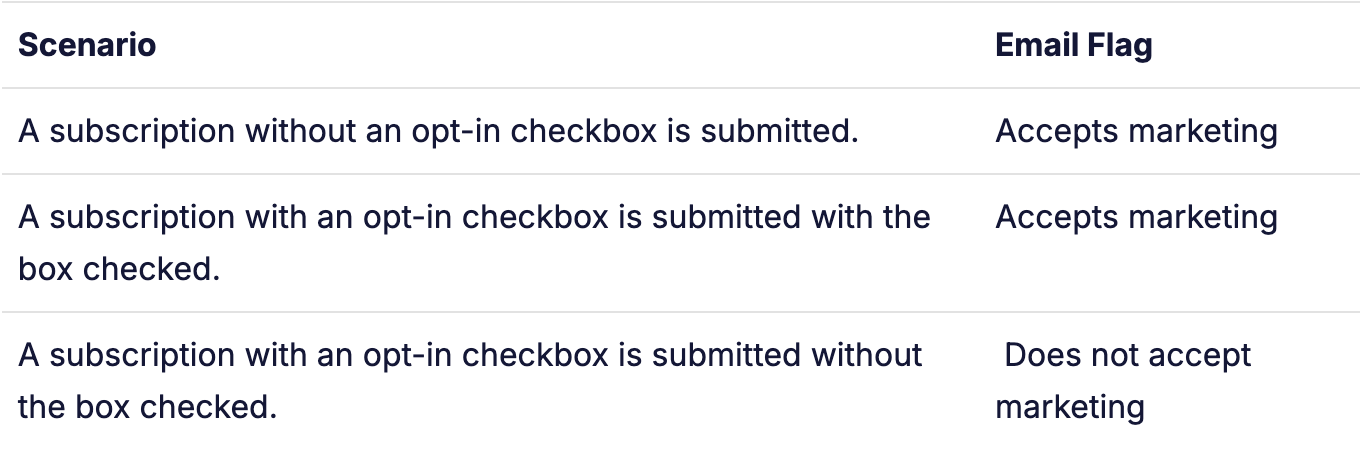 If the contact's subscription status at the partner was "unsubscribed" when Privy sent the information, the sync might resubscribe the contact on the partner's end as well. Additionally, this sync may result in the recreation of a previously deleted contact. However, both of these behaviors depend on the specifics of the partner's API.
**Syncing Unsubscribed and Suppressed contacts** - Privy does not currently support real-time syncing of this information to or from partner email service providers (ESPs).
## Text Permissions
There are currently 2 possible text permissions:
**The contact is eligible to receive text messages.** A contact becomes textable by submitting a form with the SMS opt-in legal disclaimer and also answering 'Y' to the double opt-in message sent to their number. This action provides [explicit consent](https://privy.helpscoutdocs.com/article/206-understand-marketing-consent).
**The contact is not eligible to receive texts.** The contact either provided their phone number on a form that did not include the SMS opt-in legal disclaimer, or they signed up on a form including the disclaimer but never replied 'Y' to confirm their signup.
### Managing Text Permissions
**Unsubscribing a Contact:** Contacts unsubscribe themselves by replying STOP. This disclaimer is included in all Privy texts automatically.
**Resubscribing a Contact:** Unsubscribed contacts can resubscribe themselves by either submitting a display that provides new explicit consent, or replying "UNSTOP" or "START" to a message from your toll-free number. [Learn more.](https://help.privy.com/docs/learn/compliance/understand-sms-consent#how-do-contacts-unsubscribe-and-or-resubscribe)
If the contact's subscription status at the partner was "unsubscribed" when Privy sent the information, the sync might resubscribe the contact on the partner's end as well. Additionally, this sync may result in the recreation of a previously deleted contact. However, both of these behaviors depend on the specifics of the partner's API.
**Syncing Unsubscribed and Suppressed contacts** - Privy does not currently support real-time syncing of this information to or from partner email service providers (ESPs).
## Text Permissions
There are currently 2 possible text permissions:
**The contact is eligible to receive text messages.** A contact becomes textable by submitting a form with the SMS opt-in legal disclaimer and also answering 'Y' to the double opt-in message sent to their number. This action provides [explicit consent](https://privy.helpscoutdocs.com/article/206-understand-marketing-consent).
**The contact is not eligible to receive texts.** The contact either provided their phone number on a form that did not include the SMS opt-in legal disclaimer, or they signed up on a form including the disclaimer but never replied 'Y' to confirm their signup.
### Managing Text Permissions
**Unsubscribing a Contact:** Contacts unsubscribe themselves by replying STOP. This disclaimer is included in all Privy texts automatically.
**Resubscribing a Contact:** Unsubscribed contacts can resubscribe themselves by either submitting a display that provides new explicit consent, or replying "UNSTOP" or "START" to a message from your toll-free number. [Learn more.](https://help.privy.com/docs/learn/compliance/understand-sms-consent#how-do-contacts-unsubscribe-and-or-resubscribe)