> ## Documentation Index
> Fetch the complete documentation index at: https://help.privy.com/llms.txt
> Use this file to discover all available pages before exploring further.
# Build a Strong Post-Purchase Experience
> Use Purchase Follow-Up emails to make your customers feel like more than just an order number.
You’ve put a lot of effort into acquiring new leads, turning them into signups, and securing that first order — don’t let it stop there! A customer’s post-purchase period is a crucial time to shape their perception of your brand; are they going to feel like just another transaction, or are they going to feel like a valued customer? The impression you leave behind will have a major effect on whether or not they buy from you again or influence friends, family, or coworkers to try your products.
In this guide, we’ll walk you through how to build a solid post-purchase foundation in Privy.
## Welcome New Customers
Picture a new customer at your store: what information might be valuable to them? How can you incentivize them to become a repeat customer down the line?
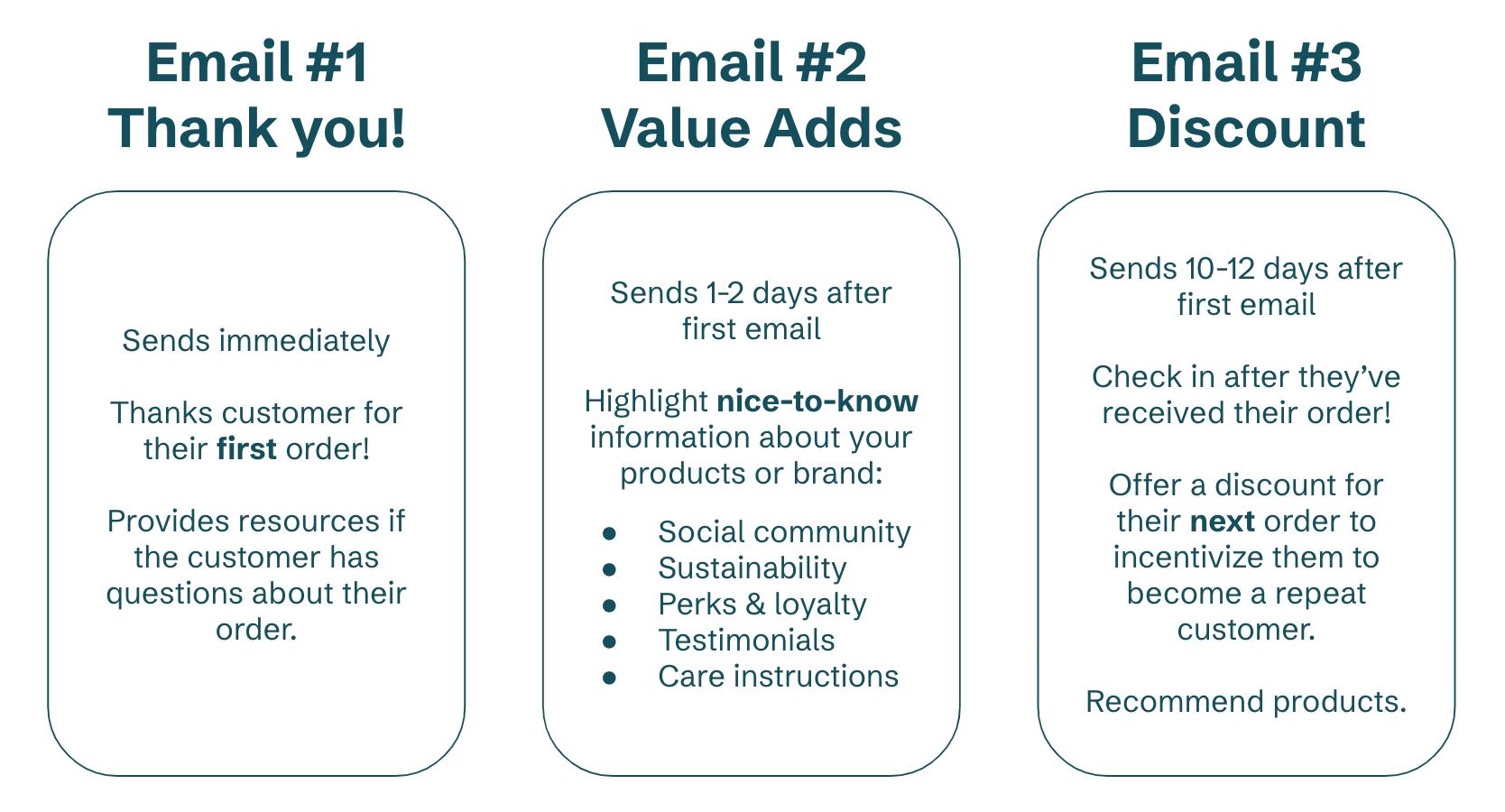
In addition to your store’s transactional emails which deliver an order confirmation and shipping information, you should activate a Purchase Follow-Up series which follows this formula:
 ### Build your series
To create a new Purchase Follow-Up series:
* Navigate to [Flows](https://dashboard.privy.com/flows) and click **New Flow** in the upper right.
* Select Purchase Follow-Up from the following menu.
* [Add more emails](https://help.privy.com/docs/learn/flows/purchase-follow-up#add-remove-emails) and [customize your templates.](https://help.privy.com/docs/learn/flows/purchase-follow-up#customize-your-templates)
In the series builder, you’ll want to make sure you have the right trigger settings in place:
* Click **Edit Settings** on the left side.
* Specify **First Order** in the dropdown menu under *Order Count.*
* Offering a discount? Make sure you attach the code under *Coupon* in your settings.
* **Save** your settings.
Need more guidance on building a Purchase Follow-Up email? [Check out this step-by-step guide.](https://help.privy.com/docs/learn/flows/purchase-follow-up)
### Best Practices
When addressing your new customers, keep these best practices in mind:
1. Use specific, tailored language like “first order” and “welcome”.
2. [Personalize the subject line and/or email body](https://help.privy.com/docs/learn/content/personalization-tags#personalizing-emails)
to include the contact’s first name.
3. Be sensitive to timing. For example, avoid offering a limited-time discount on their next order if their first order hasn’t even shipped yet.
4. Get personal — share your story so your customers know exactly who they’re supporting!
[Check out our Swipe File for inspiration and ideas!](https://www.swipewell.app/collections/1cf8fbd6-37b2-4809-93cb-74719b247892)
## Nurture Repeat Customers
After you’ve delivered a positive first impression after someone’s first order, it’s time to consider how you’re treating your loyal repeat customers. There’s a few different approaches you can take here:
Customers who invest in your brand over & over deserve some special recognition! Send over a sweet note from your team, thanking them for supporting your business + highlighting how much it means to you. Make sure you personalize your content with their first name!
You can [set a minimum order amount](https://help.privy.com/docs/learn/flows/purchase-follow-up#minimum-maximum-order-value) in your trigger settings, which can allow you to send certain content or offers to higher value customers! For example, maybe you want to send a 15% discount to a customer who spent over \$100 with you.
You can restrict a Purchase Follow-Up series from triggering based on [whether or not an order contained certain product(s) or items from certain collection(s](https://help.privy.com/docs/learn/flows/purchase-follow-up#products-collections)) — with this knowledge in hand, you can use it to trigger a cross-sell email recommending products that the customer might be interested in.
With repeat customers, you know they’ve shown consistent interest in your brand, so they’re most likely to trust your recommendations and your products.
### Build your series
To create a new Purchase Follow-Up series:
* Navigate to [Flows](https://dashboard.privy.com/flows) and click **New Flow** in the upper right.
* Select Purchase Follow-Up from the following menu.
* [Add more emails](https://help.privy.com/docs/learn/flows/purchase-follow-up#add-remove-emails) and [customize your templates.](https://help.privy.com/docs/learn/flows/purchase-follow-up#customize-your-templates)
In the series builder, you’ll want to make sure you have the right trigger settings in place:
* Click **Edit Settings** on the left side.
* Specify **More than one order** in the dropdown menu under *Order Count.*
* Offering a discount? Make sure you attach the code under *Coupon* in your settings.
* **Save** your settings.
Need more guidance on building a Purchase Follow-Up email? [Check out this step-by-step guide.](https://help.privy.com/docs/learn/flows/purchase-follow-up)
### Best Practices
When addressing your repeat customers, keep the following best practices in mind:
1. Acknowledge their continued support of your business
2. [Personalize the subject line and/or email body](https://help.privy.com/docs/learn/content/personalization-tags#personalizing-emails)
to include the contact’s first name.
3. Ask for feedback whenever possible!
[Check out our Swipe File for inspiration and ideas!](https://www.swipewell.app/collections/1cf8fbd6-37b2-4809-93cb-74719b247892)
By first providing a warm welcome to new customers and incentivizing them to become repeat buyers, then nurturing your most loyal customers, you can trust that Privy’s working in the background to secure more orders and develop stronger relationships with the people supporting your business.
### Build your series
To create a new Purchase Follow-Up series:
* Navigate to [Flows](https://dashboard.privy.com/flows) and click **New Flow** in the upper right.
* Select Purchase Follow-Up from the following menu.
* [Add more emails](https://help.privy.com/docs/learn/flows/purchase-follow-up#add-remove-emails) and [customize your templates.](https://help.privy.com/docs/learn/flows/purchase-follow-up#customize-your-templates)
In the series builder, you’ll want to make sure you have the right trigger settings in place:
* Click **Edit Settings** on the left side.
* Specify **First Order** in the dropdown menu under *Order Count.*
* Offering a discount? Make sure you attach the code under *Coupon* in your settings.
* **Save** your settings.
Need more guidance on building a Purchase Follow-Up email? [Check out this step-by-step guide.](https://help.privy.com/docs/learn/flows/purchase-follow-up)
### Best Practices
When addressing your new customers, keep these best practices in mind:
1. Use specific, tailored language like “first order” and “welcome”.
2. [Personalize the subject line and/or email body](https://help.privy.com/docs/learn/content/personalization-tags#personalizing-emails)
to include the contact’s first name.
3. Be sensitive to timing. For example, avoid offering a limited-time discount on their next order if their first order hasn’t even shipped yet.
4. Get personal — share your story so your customers know exactly who they’re supporting!
[Check out our Swipe File for inspiration and ideas!](https://www.swipewell.app/collections/1cf8fbd6-37b2-4809-93cb-74719b247892)
## Nurture Repeat Customers
After you’ve delivered a positive first impression after someone’s first order, it’s time to consider how you’re treating your loyal repeat customers. There’s a few different approaches you can take here:
Customers who invest in your brand over & over deserve some special recognition! Send over a sweet note from your team, thanking them for supporting your business + highlighting how much it means to you. Make sure you personalize your content with their first name!
You can [set a minimum order amount](https://help.privy.com/docs/learn/flows/purchase-follow-up#minimum-maximum-order-value) in your trigger settings, which can allow you to send certain content or offers to higher value customers! For example, maybe you want to send a 15% discount to a customer who spent over \$100 with you.
You can restrict a Purchase Follow-Up series from triggering based on [whether or not an order contained certain product(s) or items from certain collection(s](https://help.privy.com/docs/learn/flows/purchase-follow-up#products-collections)) — with this knowledge in hand, you can use it to trigger a cross-sell email recommending products that the customer might be interested in.
With repeat customers, you know they’ve shown consistent interest in your brand, so they’re most likely to trust your recommendations and your products.
### Build your series
To create a new Purchase Follow-Up series:
* Navigate to [Flows](https://dashboard.privy.com/flows) and click **New Flow** in the upper right.
* Select Purchase Follow-Up from the following menu.
* [Add more emails](https://help.privy.com/docs/learn/flows/purchase-follow-up#add-remove-emails) and [customize your templates.](https://help.privy.com/docs/learn/flows/purchase-follow-up#customize-your-templates)
In the series builder, you’ll want to make sure you have the right trigger settings in place:
* Click **Edit Settings** on the left side.
* Specify **More than one order** in the dropdown menu under *Order Count.*
* Offering a discount? Make sure you attach the code under *Coupon* in your settings.
* **Save** your settings.
Need more guidance on building a Purchase Follow-Up email? [Check out this step-by-step guide.](https://help.privy.com/docs/learn/flows/purchase-follow-up)
### Best Practices
When addressing your repeat customers, keep the following best practices in mind:
1. Acknowledge their continued support of your business
2. [Personalize the subject line and/or email body](https://help.privy.com/docs/learn/content/personalization-tags#personalizing-emails)
to include the contact’s first name.
3. Ask for feedback whenever possible!
[Check out our Swipe File for inspiration and ideas!](https://www.swipewell.app/collections/1cf8fbd6-37b2-4809-93cb-74719b247892)
By first providing a warm welcome to new customers and incentivizing them to become repeat buyers, then nurturing your most loyal customers, you can trust that Privy’s working in the background to secure more orders and develop stronger relationships with the people supporting your business.